library(palaeoverse)

data(reefs)
reef_counts <- group_apply(occdf = reefs, group = "interval", fun = nrow)
reefs <- look_up(occdf = reefs,
                 early_interval = "interval",
                 late_interval = "interval",
                 int_key = interval_key)
reefs <- subset(reefs, interval_max_ma <= 541)
bins <- time_bins(interval = "Phanerozoic", rank = "stage")

bin_time(occdf = reefs, bins = bins, method = "mid")Debugging with reprex() and browser()
Etienne Bacher
Niklas Hohmann
2026-11-16
Objectives
- Learn the essential steps to debug R code
- Create a small reproducible example with
reprex
- Use
browser()and breakpoints
A failing script
From the “Latitudinal trends in Phanerozoic reefs” vignette:
#> Error in `[.data.frame`:
#> ! undefined columns selected
A failing script
Using traceback() to see the chain of errors:
> traceback()
4: stop("undefined columns selected")
3: `[.data.frame`(occdf, , max_ma, drop = TRUE)
2: occdf[, max_ma, drop = TRUE]
1: bin_time(occdf = reefs, bins = bins, method = "mid") at #1
The root cause is not very clear.
Reducing the problem
Minimal reproducible example
- Longer code = more potential causes
- First: build a reproducible example, aka a reprex
-
Two steps:
- reduce the data
- reduce the code
Reduce the data
Smaller data:
- runs faster
- makes outputs easier to compare
Reduce the data
Keep only the first 6 rows:
reefs2 <- head(reefs)

reef_counts <- group_apply(occdf = reefs2, group = "interval", fun = nrow)
reefs2 <- look_up(occdf = reefs2,
                  early_interval = "interval",
                  late_interval = "interval",
                  int_key = interval_key)
reefs2 <- subset(reefs2, interval_max_ma <= 541)
bins <- time_bins(interval = "Phanerozoic", rank = "stage")

bin_time(occdf = reefs2, bins = bins, method = "mid")
#> Error in `[.data.frame`:
#> ! undefined columns selectedReduce the data
Keep 1 row and 5 columns:
Error in `group_apply()`:
! Supplied `group` is not a named column in `occdf`Reduce the data
Keep 1 row and 6 columns:
reefs2 <- head(reefs, n = 1)
reefs2 <- reefs2[, 1:6]
reef_counts <- group_apply(occdf = reefs2, group = "interval", fun = nrow)
reefs2 <- look_up(occdf = reefs2,
early_interval = "interval",
late_interval = "interval",
int_key = interval_key)
reefs2 <- subset(reefs2, interval_max_ma <= 541)
bins <- time_bins(interval = "Phanerozoic", rank = "stage")
bin_time(occdf = reefs2, bins = bins, method = "mid")#> Error in `[.data.frame`:
#> ! undefined columns selectedReduce the code
Remove as much code as possible to limit potential causes.
reefs2 <- head(reefs, n = 1)
reefs2 <- reefs2[, 1:6]
reef_counts <- group_apply(occdf = reefs2, group = "interval", fun = nrow)
reefs2 <- look_up(occdf = reefs2,
early_interval = "interval",
late_interval = "interval",
int_key = interval_key)
reefs2 <- subset(reefs2, interval_max_ma <= 541)
bins <- time_bins(interval = "Phanerozoic", rank = "stage")
bin_time(occdf = reefs2, bins = bins, method = "mid")Reduce the code
-
reef_countsis never used: remove it
- Does
subset()do anything with one row?
- No: remove it too
Reduce the code
What we have now:
Two function calls removed, but still no clear cause.
Next step
Stuck? Ask for help (GitHub, StackOverflow, colleagues).
But before that…
Is your reprex really a reprex?
Clean the environment
Our session may contain objects and options unrelated to the problem.
They can interact with our code.
Restarting R works, but is easy to forget.
reprex()
reprex::reprex() runs code in a separate, clean R session.
- Errors if the code isn’t self-contained
- If it runs in
reprex(), others can reproduce it
reprex()
reprex::reprex({
reefs2 <- head(reefs, n = 1)
reefs2 <- reefs2[, 1:6]
reefs2 <- look_up(occdf = reefs2,
early_interval = "interval",
late_interval = "interval",
int_key = interval_key)
bins <- time_bins(interval = "Phanerozoic", rank = "stage")
bin_time(occdf = reefs2, bins = bins, method = "mid")
})reefs2 <- head(reefs, n = 1)
#> Error:
#> ! object 'reefs' not foundreprex()
reprex::reprex({
library(palaeoverse)
data(reefs)
reefs2 <- head(reefs, n = 1)
reefs2 <- reefs2[, 1:6]
reefs2 <- look_up(occdf = reefs2,
early_interval = "interval",
late_interval = "interval",
int_key = interval_key)
bins <- time_bins(interval = "Phanerozoic", rank = "stage")
bin_time(occdf = reefs2, bins = bins, method = "mid")
})bin_time(occdf = reefs2, bins = bins, method = "mid")
#> Error in `[.data.frame`:
#> ! undefined columns selectedreprex()
Good practice: add session info with session_info = TRUE.
Reducing the problem is key, and often reveals the bug by itself.
Debugging a function
Debugging a function
A function runs a whole block of code and only shows the final error.
One solution: add print() statements.
Better: browser() pauses execution inside the function.
Example
Based on issue #280 in palaeoverse (now fixed):
Error in `bin_space()`:
! object 'secondary' not found
bin_space() is a long function: where does it fail?
browser()
Add browser() at the top, reload the function, and rerun the code:
browser()
Execution stops at browser():
- We have access to the function environment.
- Press “Enter” to run the next statement.
- Only the path actually taken is executed (e.g. no
if (FALSE)).
- Press “Esc” or run
Qto exit.
browser()
Step through until the code fails:
Tip: move browser() past lines that are irrelevant.
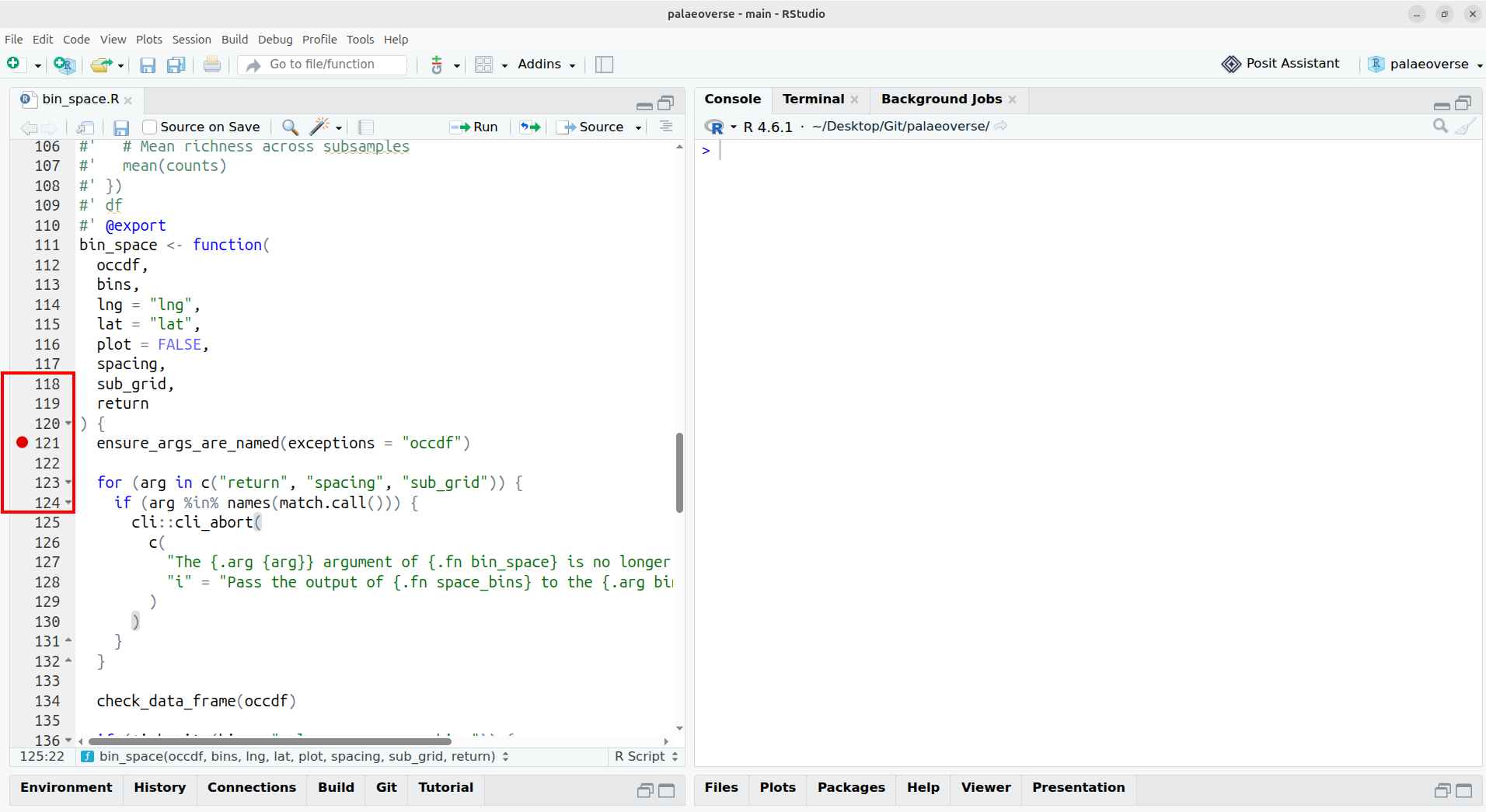
Breakpoints
Built into IDEs like RStudio or Positron.
Click left of a line number to add one.
Same as browser(), without modifying the code.
Breakpoints
Conclusion
Conclusion
- Reduce the data and the code
- Check your reprex with
reprex()
- Inspect functions with
browser()and breakpoints
Good debugging helps you fix your code and improves bug reports.